Stop Buying AI Tools. Start Building AI Systems. Here's the Difference.
Last quarter, I talked to a consulting firm that had subscribed to eleven different AI tools. ChatGPT for writing. Otter.ai for meeting notes. Fireflies for transcripts. A separate tool for proposals. Another for social media. Another for email. Eleven subscriptions, eleven logins, eleven things someone had to actually open, type into, and manage every single day.
Their monthly spend: nearly $3,000. Their time savings: almost none.
Because here's what they'd actually built: a more expensive version of the same manual workflow they had before. They swapped one type of human effort for a slightly different type. Instead of writing the email, they were prompting the email. Instead of drafting the proposal, they were copying and pasting into the tool, editing the output, copying it back out. The friction shifted. It didn't disappear.
I've been building systems that have to survive contact with reality since 1995, when I founded adoption.com before Google existed, before there were playbooks for what internet infrastructure should even look like. I ran operations across three continents. I managed logistics in Ethiopia, Kenya, and Haiti where "the system goes down" meant something very different than it means in a suburban office park. What I learned, over 30 years of building things that actually have to work, is this: a tool requires a human to activate it every single time. A system runs whether you're there or not.
That distinction isn't semantic. It's the whole game.

The Precise Difference Between a Tool and a System
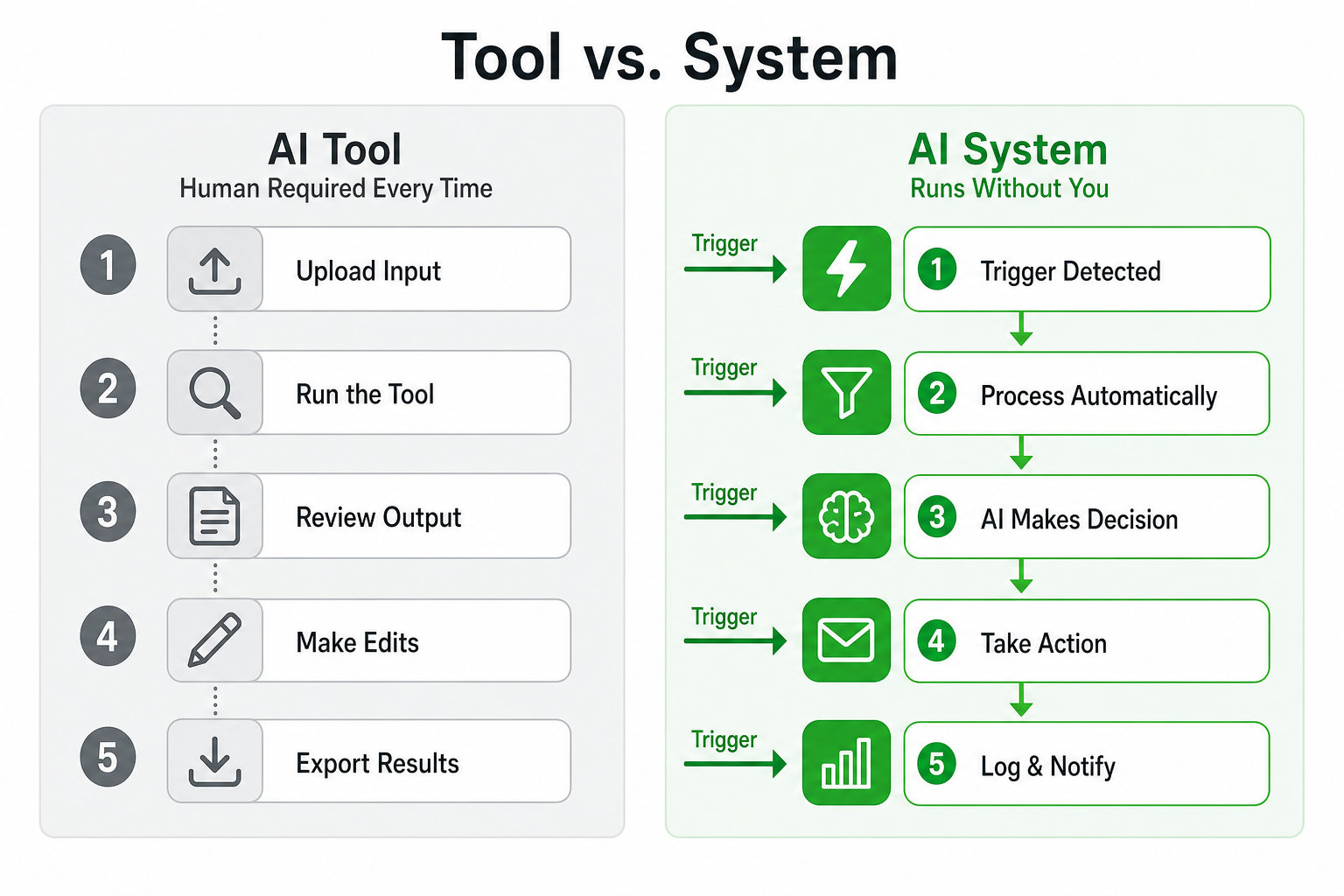
Here's the clearest definition I can give you.
A tool is something you use. A system is something that runs.
When you open ChatGPT, type a prompt, read the output, copy what you want, and paste it somewhere else, you are using a tool. A human had to initiate it. A human has to supervise it. A human has to extract the value and put it somewhere useful. Remove the human and nothing happens. The tool just sits there.
When a new lead fills out a form on your website and that form submission automatically enriches the contact data via an API, scores the lead against your ideal customer profile, updates your CRM, triggers a personalized email sequence, and notifies the right salesperson with a briefing document, that's a system. No one on your team had to touch it. The trigger fired. The sequence ran. The output landed in the right place.
The difference is autonomy over time. Tools give you leverage when you show up. Systems give you leverage when you don't.
Gartner predicted that by end of 2026, 40% of enterprise applications would include task-specific AI agents, up from less than 5% in 2025 [1]. That's not because companies suddenly got smarter about ChatGPT prompts. It's because the market is finally figuring out that plugging AI into autonomous workflows, not just giving humans better writing assistants, is where the real value sits.
Why Most Businesses Buy Tools Instead of Building Systems

I want to be honest about this before I tell you what to do instead, because I've made the same mistake myself.
Tools are seductive for three very good reasons.
First, they're tangible immediately. You can open a tool today, see it do something impressive in 30 seconds, and feel like you've made progress. Systems require design, integration, testing, and failure. They take longer to feel like anything.
Second, they require lower commitment. A $49/month subscription is a rounding error in most budgets. A proper system build requires time, architecture decisions, sometimes a consultant (full disclosure: that's me), and ongoing maintenance. The upfront cost is higher and the ROI is less visible on day one.
Third, they're sold brilliantly. AI tool vendors have world-class marketing. They show you the best-case scenario in a polished demo with perfect inputs and no edge cases. System building doesn't have a product page. Nobody's putting billboards up for "thoughtful workflow orchestration."
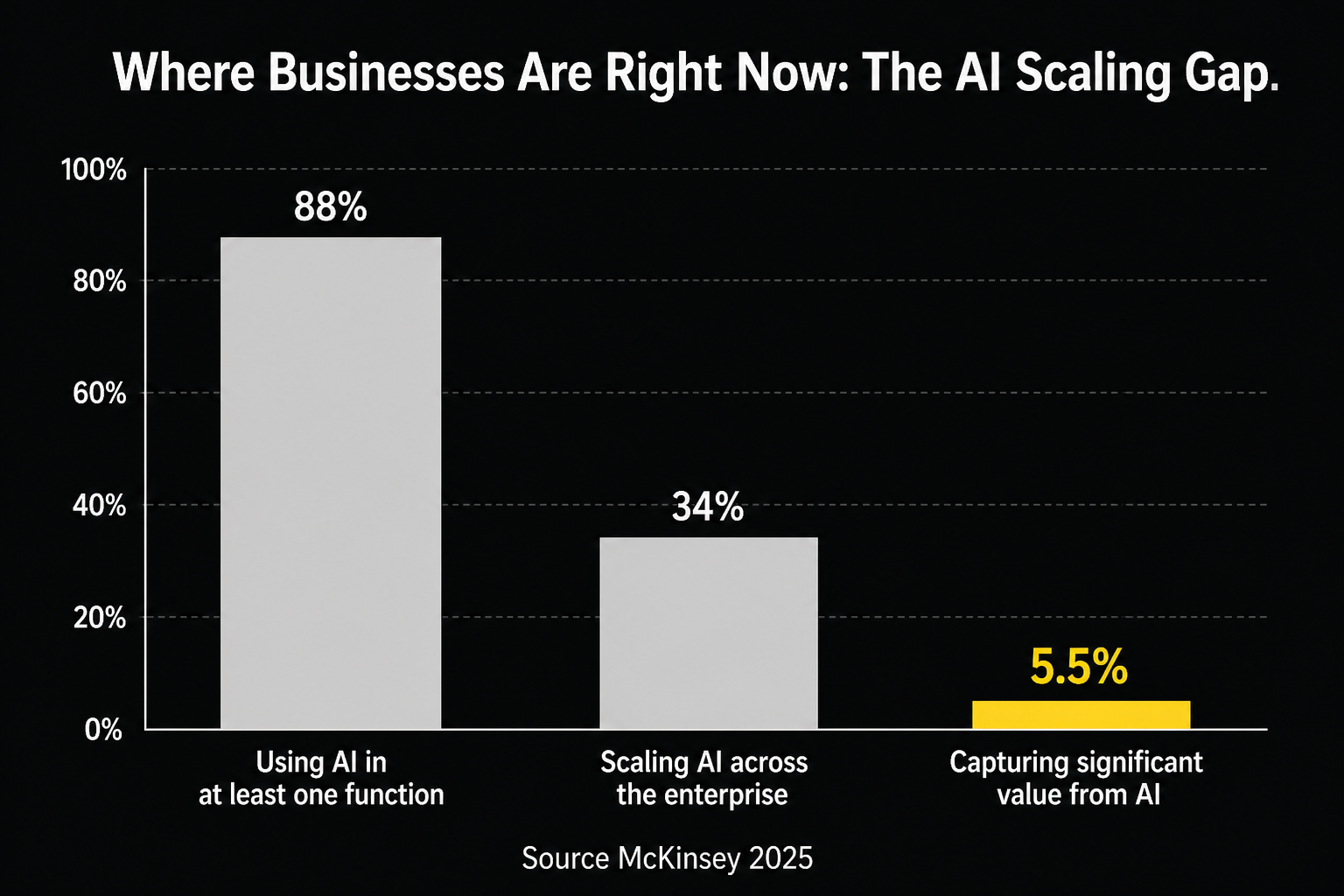
The result is that most organizations end up in what McKinsey calls "the scaling gap." Their 2025 State of AI report found that nearly 88% of companies now use AI in at least one function, but nearly two-thirds haven't begun scaling it across the enterprise [2]. Only 5.5% of companies drive significant value from AI [2]. The rest are subscribed to the tools. They're just not running the systems.
And the failure rates are sobering. A 2024 RAND Corporation analysis found that more than 80% of AI projects fail, which is twice the failure rate of non-AI technology projects [3]. A 2025 S&P Global survey of more than 1,000 enterprises found that 42% of companies abandoned most of their AI initiatives, up sharply from 17% in 2024 [3]. These aren't failures of AI capability. They're failures of implementation approach.
Gartner's own 2026 prediction is that more than 40% of agentic AI projects will be canceled by end of 2027 due to escalating costs, unclear business value, or inadequate risk controls [1]. That's a real risk. But the risk isn't in building systems. It's in building the wrong systems, poorly.
Five Real Comparisons: Tool vs. System
Let me walk you through five specific examples. I'll show you the tool version most businesses are running, and then I'll show you what a system version of the same problem actually looks like.
1. Lead Qualification
The tool version: Your sales team uses ChatGPT to write cold outreach emails. They paste in prospect names one at a time, ask for a personalized opener, edit the draft, copy it into Gmail, send it. Maybe 10 leads per hour if they're fast.
The system version: A new contact enters your CRM. An automation (built in something like n8n, Make, or a custom agent workflow) immediately pulls public data from LinkedIn and company websites to enrich the record, scores the lead against your ideal customer profile using a defined rubric, assigns it to the right rep based on territory and specialty, sends a personalized first-touch email (truly personalized, using the enriched data), and adds a follow-up task to the rep's queue with a briefing document. The whole thing runs in under three minutes. No human touched it until the rep opens their briefing.
Companies implementing AI-driven lead qualification report 50% increases in sales-ready leads and conversion rate improvements of 15-40% [4]. One FinTech firm saw a 215% increase in qualified leads after automating their qualification pipeline [4]. Those numbers don't come from better AI prompts. They come from eliminating the human bottleneck in the middle of the process.
2. Customer Support Triage
The tool version: A support agent opens a help desk ticket, reads it, decides it's a billing question, reassigns it to the billing team, and marks it as in progress. Then they do that again. And again. For eight hours.
The system version: Incoming tickets are automatically classified by topic, sentiment, and urgency using an AI model connected to your help desk. Routine questions (password resets, order status, policy lookups) are answered automatically by an agent with access to your knowledge base. Complex tickets are routed to the right specialist with a pre-generated summary. Escalations are flagged immediately. The AI-based routing alone saves agents around 1.2 hours daily [5]. First response time drops from hours to minutes.
At scale, AI can handle 65% of incoming support queries without human intervention [5], up from 52% in 2023. IBM research found that AI can reduce customer service operational costs by 30-50% [5]. That's not a prompt. That's a pipeline.
3. Content Publishing
The tool version: Your marketing person opens Claude or ChatGPT, writes a prompt for a blog post, edits the draft, copies it into WordPress, uploads images manually, writes a meta description, publishes it, then manually shares it across your social channels. Four hours of work per piece, plus they still have to think of the topics.
The system version: A content calendar defines your topic clusters. A weekly trigger fires automatically, pulls the next topic, generates a structured draft using your brand voice, formats it for your CMS, pulls in a relevant image from your library, generates the meta description and social variants, schedules the post, and queues up the social posts to fire on the correct schedule. Your human reviews the output and hits approve. Or doesn't, if they trust the system.
Marketers using AI workflow automation save an average of three hours per content piece and 2.5 hours per day [6]. Teams reclaim 5-10 hours per week per person managing social media [6]. The numbers vary by implementation, but the direction never does. Systems compress the human time required per output unit. Tools just shift where the human spends their time.
4. Financial Reporting
The tool version: Someone downloads a CSV from your accounting software, pastes it into a spreadsheet, runs some formulas, copies the key numbers into a slide deck, adds commentary, and emails it to the leadership team. Monthly. Every month. Forever.
The system version: On the first of each month, an automated workflow pulls data directly from your accounting API, runs your standard analysis against prior periods and benchmarks, generates a formatted report with commentary, highlights any variances outside your defined thresholds, and delivers it to your leadership team before they've had their first coffee. No human assembled it. A human reviews it.
The UiPath 2026 AI and Agentic Automation Trends Report found that autonomous execution lets agents handle full processes independently, cutting cycle times by 30-50% [7]. Finance is one of the highest-ROI areas because the data is structured, the workflow is repetitive, and the cost of errors is high enough to justify the investment in building it right.
5. Onboarding New Clients
The tool version: A project manager gets notified that a new client signed. They open a checklist document. They manually send a welcome email. They create a Slack channel. They set up project folders. They schedule a kickoff call. They draft a project brief. Each step exists in a different tool. Each step requires them to open, navigate, and act.
The system version: When a contract is marked "signed" in your CRM, an automation fires: it creates the project in your PM tool, spins up the Slack channel with the right members, sends a branded welcome email with a pre-built intake questionnaire, adds the client to your email sequence, books a kickoff call using your scheduling link, and generates a draft project brief from the contract details. The project manager gets a Slack notification that everything's ready. They show up to the kickoff already organized.
This is the kind of system that pays for itself in weeks, not years. McKinsey's research found that workflow automation (intake, scheduling, content production, lead qualification) has a typical payback period of two to six months [2]. That's the sweet spot for most small businesses.
Why Systems Win Long-Term: The Math of Compounding
Here's the part that most people don't fully grasp until they see it in their own numbers.
Tools scale linearly with human effort. If your team can qualify 10 leads per hour using AI tools, and you want to qualify 100 leads per hour, you need approximately 10 times the human time. You might shave some of that with better prompts or templates, but you're still fundamentally linear.
Systems have near-zero marginal cost per additional task. A customer support system that handles 1,000 tickets doesn't need to double its infrastructure to handle 2,000. A content publishing system that posts five times per week doesn't need twice the resources to post ten times per week. As one analysis noted: "AI agents break this linearity by introducing a near-zero marginal cost per additional task handled" [8].
That's not a metaphor. It's a structural cost advantage that compounds over time.
The organizations that are capturing this are seeing real returns. Agentic AI deployments at production scale report a median ROI of 171% globally, and 192% for US enterprises specifically [9]. Companies using AI sales agents report 7-25% revenue increases and up to 70% conversion rate improvements [9]. These numbers aren't coming from people who bought better tools. They're coming from organizations that made the architectural shift.
I'm a medical technologist by training. Before I became a technology builder, I worked in clinical labs where precision wasn't optional and where the cost of a process failing wasn't a missed deadline but a misdiagnosis. That background gave me a specific lens on systems: what matters is not whether the system works when conditions are ideal. What matters is whether it works reliably at volume, over time, with real-world inputs that don't look anything like the demo.
The 40% cancellation rate Gartner is projecting for agentic AI projects isn't a technology problem. It's an architecture problem. Most of those failures will be organizations that tried to build systems without first designing them carefully, or tried to automate processes that aren't actually well-defined yet, or bought platforms before they understood what they were trying to automate.
That's the honest reality. Systems are better than tools. They're also harder to build correctly.
The Three Questions to Ask Before You Build Anything
When a client comes to me and wants to "do more with AI," I ask them three questions before we talk about any technology.
First: Is this process actually defined? You can't automate a process that doesn't exist yet or that changes every time someone runs it. Before you build anything, you need to be able to write the process down, step by step, including what happens when things go wrong. If you can't write it down, you can't automate it. You'll just automate the chaos.
Second: What's the cost of a mistake? Some processes should be supervised even when they can be automated. An AI that automatically sends a legal notice without human review is a different risk profile than an AI that automatically schedules a social media post. Know your failure modes before you build.
Third: What's the trigger? Every system needs a trigger. An event that fires and sets the chain in motion. If you can't identify a clean trigger (a form submission, a status change, a date, an incoming email), you probably don't have a system yet. You have a workflow that still needs a human to notice when to start it.
These questions aren't gatekeeping. They're the difference between a system that runs for years and an automation that someone has to babysit every week.
What This Means for Your Business Right Now
I won't pretend this is a small shift. Eighty-seven percent of large enterprises are now investing an average of $6.5 million annually in AI [3]. You don't have to spend $6.5 million. But you do need to make a real architectural decision: are you building capability, or are you buying convenience?
McKinsey found that 23% of organizations are already scaling agentic AI systems, with another 39% experimenting with AI agents [2]. The window for competitive advantage from being early is still open, but it's closing faster than most people realize.
Here's what I recommend:
Start with one process, not eleven tools. Pick the workflow that costs the most human time, has a clear trigger, and produces a measurable output. Build that system properly. Get it running. Then move to the next one.
Audit your current tool subscriptions. List every AI tool you're paying for. For each one, ask: does this require a human to activate it every time? If yes, it's a tool. That's not inherently wrong, but you should know what you're buying.
Invest in integration, not just generation. The value in AI isn't in generating content or answers in isolation. It's in connecting the output to somewhere useful without a human in the middle. That means APIs, webhooks, workflow orchestration, and data hygiene. Less glamorous than the demo. More valuable than anything the demo showed you.
Don't try to automate everything at once. Successful AI transformations allocate roughly 70% of their efforts to people, process, and culture changes, not just technology [3]. The system won't save you if the process it's automating was broken to begin with.
I'll be straight with you: I'm new to AI consulting specifically. What I bring is a Cap Gemini background from the 1990s, when we were helping large organizations make the tools-vs-systems decision about a different transformative technology (the internet), and 30 years of building real operational systems from adoption.com to humanitarian infrastructure across seven countries. I've also built AI agents and web apps myself using Claude Code and Codex, so I'm not working from theory. The distinction between a tool you activate and a system that runs is one I've lived on both sides of, and it's as real now as it was in 1997.
Stop buying AI tools. Start building AI systems. The difference isn't in the technology. It's in the decision about what you're actually trying to build.
Sources
[1] Gartner, "Gartner Predicts 40% of Enterprise Apps Will Feature Task-Specific AI Agents by 2026, Up from Less Than 5% in 2025," https://www.gartner.com/en/newsroom/press-releases/2025-08-26-gartner-predicts-40-percent-of-enterprise-apps-will-feature-task-specific-ai-agents-by-2026-up-from-less-than-5-percent-in-2025, 2025
[2] McKinsey & Company, "AI in the Workplace: Superagency in the Workplace," https://www.mckinsey.com/capabilities/tech-and-ai/our-insights/superagency-in-the-workplace-empowering-people-to-unlock-ais-full-potential-at-work, 2025
[3] The Data Experts / S&P Global / RAND Corporation, "Enterprise AI Failure Rate: Why 95% of Projects Fail," https://www.thedataexperts.us/writing/enterprise-ai-failure-crisis-95-percent-failure-rate.html, 2025
[4] Click Vision / Persana AI, "65+ AI Lead Generation Statistics (2026): Conversion & ROI," https://click-vision.com/ai-lead-generation-statistics, 2026
[5] Freshworks, "How AI is Unlocking ROI in Customer Service: 58 Stats and Key Insights for 2025," https://www.freshworks.com/How-AI-is-unlocking-ROI-in-customer-service/, 2025
[6] Distribution.ai / Medium/Evan Rose, "Social Media Automation: How to Save 5+ Hours Every Week," https://www.distribution.ai/blog/social-media-automation, 2025
[7] UiPath, "2026 AI and Agentic Automation Trends Report," https://www.uipath.com/resources/automation-whitepapers/automation-trends-report, 2026
[8] Acropolium, "AI Agent Unit Economics: TCO, ROI, Payback," https://acropolium.com/blog/ai-agent-unit-economics/, 2025
[9] Conversational Geek / Accelirate, "40+ Agentic AI Statistics for 2026," https://stats.conversationalgeek.com/blog/agentic-ai-statistics-2026, 2026
[10] Hype Studio / AutomaTon Agency, "AI Automation ROI 2025: 25-45% Gains + Proven Framework," https://hypestudio.org/ai-automation-roi-business-impact-the-complete-guide-2025/, 2025
[11] Wazobia Tech, "AI Automation Trends in 2026: 7 Shifts Driving Real ROI," https://wazobia.tech/blog/ai-and-automation-trends-2026, 2026