AI for Service Businesses: What Actually Works, With Real Numbers
I started my first internet company in 1995. Back then, I'd tell people about the web and they'd look at me like I was selling futures contracts on imaginary corn. I learned something important in those early years: the people who made money from new technology weren't the ones who hyped it loudest. They were the ones who figured out, fast and specifically, which problems the technology actually solved.
We're in the same moment right now with AI. Except this time, the hype is so thick you can choke on it.
So let me tell you what I know from working with professional service businesses across legal, accounting, consulting, agencies, and healthcare administration. Not what the pitch decks say. What's actually happening in real firms, with real numbers attached.
The headline: AI is delivering genuine, measurable ROI in professional services, but in six specific applications. Everything else is mostly noise. I'm going to walk you through each one.

The Baseline: Where Professional Services Actually Stands
Before I get into the specifics, let me anchor this in real data.
The Thomson Reuters 2026 AI in Professional Services Report surveyed more than 1,500 professionals across legal, accounting, consulting, and tax practices. The findings are striking: generative AI use has nearly doubled in a single year, with 40% of professionals reporting their organizations now use it, up from just 22% in 2025. [1]
In legal specifically, 41% of law firms now use generative AI widely, up from 28% the prior year. [1] Among accountants, 66% report already using AI in some form. [2] Those aren't experimental pilots anymore. That's mainstream adoption.
But here's the number that should stop you cold: only 18% of organizations are actually measuring whether their AI investments are working. Of those that do measure, 77% track only internal metrics like cost savings and employee usage. Almost none measure client satisfaction or revenue impact. [1]
In other words, most of the firms adopting AI can't tell you if it's working. That's the gap I help businesses close.
The good news: for the six applications I'm about to describe, we have real measurement data. We know what's working, by how much, and what you need in place before you start.
What It Takes to Get AI ROI in a Service Business
I want to say something blunt before we get into the specific applications, because I see this mistake constantly.
AI doesn't fix broken processes. It amplifies whatever system you already have, good or bad. If your client intake process is chaotic, AI-powered intake will be chaotic faster. If your billing workflow has approval gaps, AI billing automation will hit those gaps at scale.
My background is medical technology. In clinical labs, we have a concept called "garbage in, garbage out." You can run a perfectly calibrated analyzer on a bad specimen and get a result that's precise to four decimal places and completely wrong. AI in professional services works the same way.
The firms I see getting the highest returns from AI have three things in place first:
- Documented processes. If you can't write down the steps, you can't automate them.
- Clean data. CRM records that are accurate, complete, and consistent.
- A human review checkpoint. Especially for anything that goes to clients. AI makes mistakes. The firms that get burned are the ones that removed the human from the loop entirely.
With that foundation, here are the six applications that are delivering real returns right now.
Application 1: Document Review and Extraction
What It Replaces
Every professional service business drowns in documents. Contracts, medical records, financial statements, regulatory filings, discovery materials. Reading them, extracting the relevant data points, flagging the issues: this is skilled work that takes enormous time and carries significant error risk when humans are tired.
The Numbers
This is where AI ROI is most dramatic and most documented.
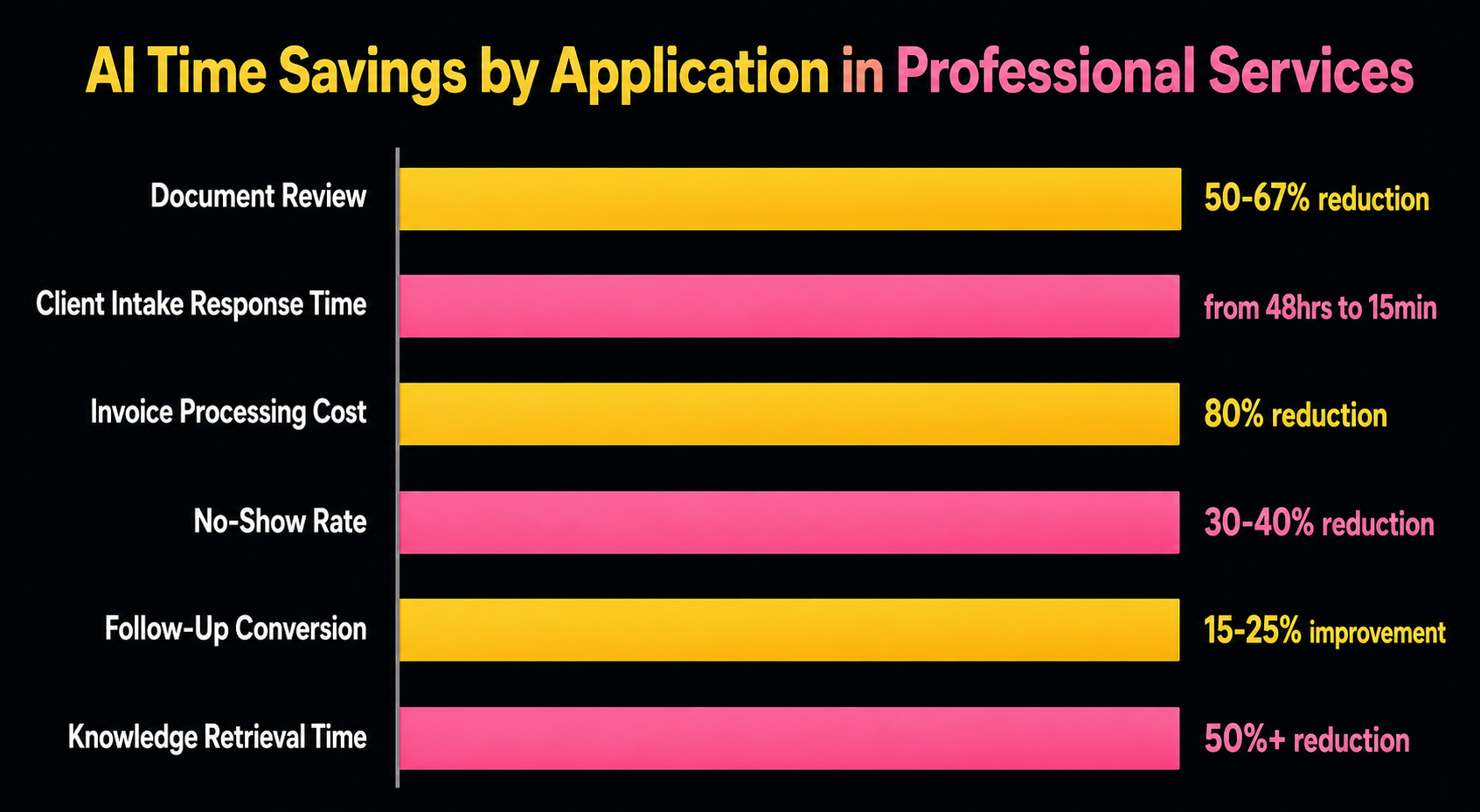
In legal, document review already consumed 80% of legal AI adoption activity as of 2026. [1] The case results are concrete: one Am Law 100 firm used generative AI to review nearly 130,000 documents in a government investigation and cut their review time by 50% to 67% compared to traditional methods. [3]
In healthcare, AI-driven medical record review cuts analysis time by 50% compared to manual methods. [4] For law firms handling personal injury cases, that means what used to take a paralegal three weeks to summarize now takes three days.
In accounting, AI tools are extracting data from invoices, receipts, and bank records and entering it into accounting systems, with the combination of reduced errors and eliminated rekeying delivering measurable capacity gains. [5]
The Time Math
If your team spends 20 hours per attorney or accountant per week on document review and extraction, and AI reduces that by 50%, you've added 10 billable hours per person per week. At $250/hour, that's $2,500 per professional per week in recovered capacity. For a 10-person firm, that's $1.3 million in annual recovered time.
What You Need in Place
Your documents need to be in a consistent format or you need a preprocessing step. Scanned PDFs that haven't been OCR'd will perform poorly. The tools that work best here include Everlaw, Relativity, Harvey, and CoCounsel for legal; for healthcare, GetCodes and similar medical record platforms; for financial documents, tools like Docsumo, Rossum, or Hyperscience.
The Failure Mode to Avoid
Don't remove human review from high-stakes extractions. AI still hallucinates. It still misses nuance. One misread clause in a contract or one missed lab value in a medical record can create liability that dwarfs whatever you saved in review time.
Application 2: Client Intake and Qualification
What It Replaces
The first 24 hours of client contact are where most professional service businesses lose money without knowing it. Someone fills out a contact form at 9 PM on a Friday. It sits until Monday morning. The firm calls back Tuesday afternoon. The prospect signed with someone else Tuesday morning.
Or: a salesperson spends 45 minutes on an intake call with a prospect who doesn't meet the firm's minimum engagement size. That's 45 minutes that could have been a qualified conversation.
The Numbers
Here's a stat that should get your attention: firms using AI client intake systems report cutting response time from 48+ hours to under 15 minutes, which boosts conversion rates by up to 65%. [6]
One personal injury firm tracked before-and-after numbers carefully. Using paper-based intake forms, only 22% of leads completed the onboarding process. After switching to a digital AI-assisted system, that figure rose to 61%, a 177% improvement in form completion. [6]
Another data point: AI chatbots enhance conversions by 23% and resolve intake issues 18% faster, according to a Glassix study of their deployed systems. [7]
Using AI intake solutions, firms report up to 32.5 workdays saved annually per staff member handling intake, just from eliminating manual data entry and qualification calls that didn't need to happen. [6]
What You Need in Place
You need a defined qualification criteria: what makes someone a good client for your firm? Revenue threshold, geography, case type, industry. You can't automate qualification if you haven't defined what "qualified" means. You also need your intake flow documented as a decision tree before you can automate it.
Tools Used Most Often
Clio Grow (legal), Lawmatics (legal), Salesforce with AI flows (consulting, agencies), and for healthcare admin, Epic's automated intake modules or tools like Clearstep. For general professional services, Typeform plus Zapier plus an AI classification layer handles most needs.
The Important Caveat
AI intake works well for straightforward qualification. It doesn't work well for complex, sensitive, or emotionally charged situations. A domestic violence victim calling a family law firm doesn't want to talk to a bot. Know your client type before you automate intake.
Application 3: Billing and Invoice Processing
What It Replaces
Manual invoice processing is quietly one of the most expensive things most service businesses do. Not because anyone is incompetent. Because it's inherently time-consuming, error-prone, and a terrible use of skilled staff time.
The Numbers
The cost comparison here is striking. Manual processing of a single invoice costs between $12.88 and $19.83 on average, when you account for staff time, error correction, and approval workflow. AI-automated invoice processing brings that cost down to $2.36 to $2.78 per invoice, according to Ascend's 2025 benchmarks. [8]
That's a cost reduction of roughly 80%.
On throughput: a fully automated AP workflow processes an average of 30 invoices per hour. Manual processing handles five. Same math, different direction: an 80% reduction in time per invoice. [8]
For a firm processing 200 invoices per month, that shift from $15 average to $2.50 average saves about $3,000 per month. That pays for most mid-market automation tools in the first month.
The broader data backs this up: automating accounts payable reduces processing costs by up to 80% and shrinks invoice cycle times from 7 to 13 days down to same-day or next-day. [8]
For professional services specifically, there's a second benefit beyond processing cost: billing accuracy. PSA (Professional Services Automation) users achieve 30% better billing accuracy than non-users, which directly reduces write-offs and disputes. [9]
What You Need in Place
Your billing codes, service descriptions, and client billing preferences need to be standardized. AI invoice processing is very good at extracting and categorizing structured data. It's less good at interpreting custom exceptions that only exist in someone's head.
Tools Used Most Often
Bill.com, Ramp, Tipalti for AP automation. For professional services billing specifically, Clio Payments (legal), QuickBooks with AI features, and Sage Intacct. For larger operations, SAP's AI billing tools and Oracle Fusion.
Application 4: Appointment Scheduling and Reminders
What It Replaces
No-shows are a silent revenue killer in service businesses. In healthcare, they represent an average of $150 billion in lost revenue annually in the US. In legal and consulting, a missed consultation means a time slot that can't be recovered and a prospect relationship that's been damaged.
The Numbers
Automated reminder sequences reduce no-show rates by 30% to 40% across professional service categories. [10] Some implementations report even higher results: clinics using multi-touch AI reminder systems with built-in rescheduling links report 30% no-show reduction within the first 60 days of deployment. [10]
For practices with significant appointment volume, this compounds quickly. A medical practice with 100 appointments per week and a 15% no-show rate loses 15 appointments weekly. At a $200 average visit value, that's $3,000 per week, $156,000 per year. Cutting the no-show rate to 9% (a 40% reduction) recovers $93,600 annually.
The scheduling automation piece is equally valuable. AI scheduling assistants eliminate the back-and-forth email chain that typically takes 5 to 8 messages to book a single appointment. For a professional billing at $300/hour, eliminating 15 minutes of scheduling friction per booking and handling 20 bookings per week saves 5 hours weekly, or $1,500 in recovered billing time.
What You Need in Place
Integration with your existing calendar system and practice management software. Most scheduling automation tools connect to Google Calendar, Outlook, Clio (legal), Jane (healthcare), and similar platforms. You also need defined appointment types with accurate duration estimates, because AI scheduling can't time-block correctly if appointment types aren't defined.
Tools Used Most Often
Acuity Scheduling, Calendly, and Jane App (healthcare) for mid-market. For larger legal and healthcare operations, Salesforce Health Cloud, Clio Scheduler, and NexHealth. AI-native reminder tools include Luma Health (healthcare) and Remedly.
Application 5: Follow-Up Sequence Automation
What It Replaces
Most professional service businesses are terrible at follow-up. Not because they don't care. Because follow-up is time-consuming, easy to de-prioritize, and falls through the cracks when people get busy.
A prospect who asked for a proposal three weeks ago and never heard back didn't necessarily say no. They just moved on because you went quiet. That's recoverable revenue that never got recovered.
The Numbers
The data on automated follow-up sequences is compelling across industries. Automated email campaigns achieve 52% higher open rates and 332% higher click-through rates compared to manual one-off sends. [11] Properly configured automated sequences drive 37% to 41% of all email-generated revenue, producing 320% higher revenue per message than broadcast campaigns. [11]
For professional services specifically, the follow-up gap is significant. Most consultants and attorneys send one proposal and then wait. AI-managed follow-up sequences that trigger at defined intervals (day 3, day 7, day 14, day 30) typically convert 15% to 25% more proposals than manual one-touch follow-up.
The other dimension: client retention. Automated check-in sequences for existing clients, monthly touchpoints, satisfaction surveys at defined intervals. These keep your firm top-of-mind and surface issues before they become client churn. Firms using structured retention automation report measurably higher lifetime client value, though the specific numbers vary widely by industry and implementation.
What You Need in Place
A CRM that tracks prospect and client status reliably. If you're not tracking whether a proposal was sent, when it was sent, and what the current status is, automation can't trigger off of those events. You also need email content written and approved before the automation runs: AI can personalize and optimize send timing, but the messages need to reflect your firm's voice.
Tools Used Most Often
HubSpot, ActiveCampaign, and Keap for smaller professional service firms. Salesforce with Marketing Cloud or Pardot for larger organizations. Clio Grow includes follow-up automation specifically for legal practices.
Application 6: Internal Knowledge Routing
What It Replaces
Here's the application that most people overlook, and it might be the one with the highest long-term return.
Every professional service firm has institutional knowledge that lives in people's heads. Where to find the precedent brief for this type of contract dispute. Which template to use for this type of engagement letter. Who handled the last client with a similar situation and what did they do. When a senior person leaves, that knowledge walks out the door.
AI knowledge routing systems make institutional knowledge searchable, surfaceable, and persistent.
The Numbers
The AI-driven knowledge management market is growing at 46.7% annually, which is a market signal that organizations are paying for this. [12] More concretely, 38% of knowledge management teams are already using AI to recommend content or knowledge assets. [12]
In consulting and legal, where the product is literally expertise, knowledge routing has an asymmetric payoff. McKinsey's internal AI tool (called Lilli) and BCG's tools have reached the point where they can perform roughly 80% of a junior analyst's typical research and slide-generation work. [13] That doesn't eliminate junior staff, but it means senior partners can operate with different leverage ratios than before.
For smaller professional service firms, the practical version of this is an internal AI assistant trained on your documents, past work product, templates, and client records. Staff ask it questions in plain language and it surfaces relevant precedents, templates, and context. The alternative is spending 30 minutes hunting through shared drives for something that may or may not exist.
What You Need in Place
Your firm's knowledge needs to be digitized, organized, and accessible. If your best work lives in one partner's personal folder that nobody else can see, or in paper files, AI knowledge routing can't help you. The investment before the investment is documentation and organization.
Tools Used Most Often
Microsoft Copilot (integrates with existing Office environments), Notion AI, Guru, Glean, and for legal specifically, iManage with AI features. For legal research specifically, Westlaw Precision (Thomson Reuters) and Lexis+ AI are the market leaders and both now include knowledge routing capabilities.
What the Numbers Tell Us About Where to Start
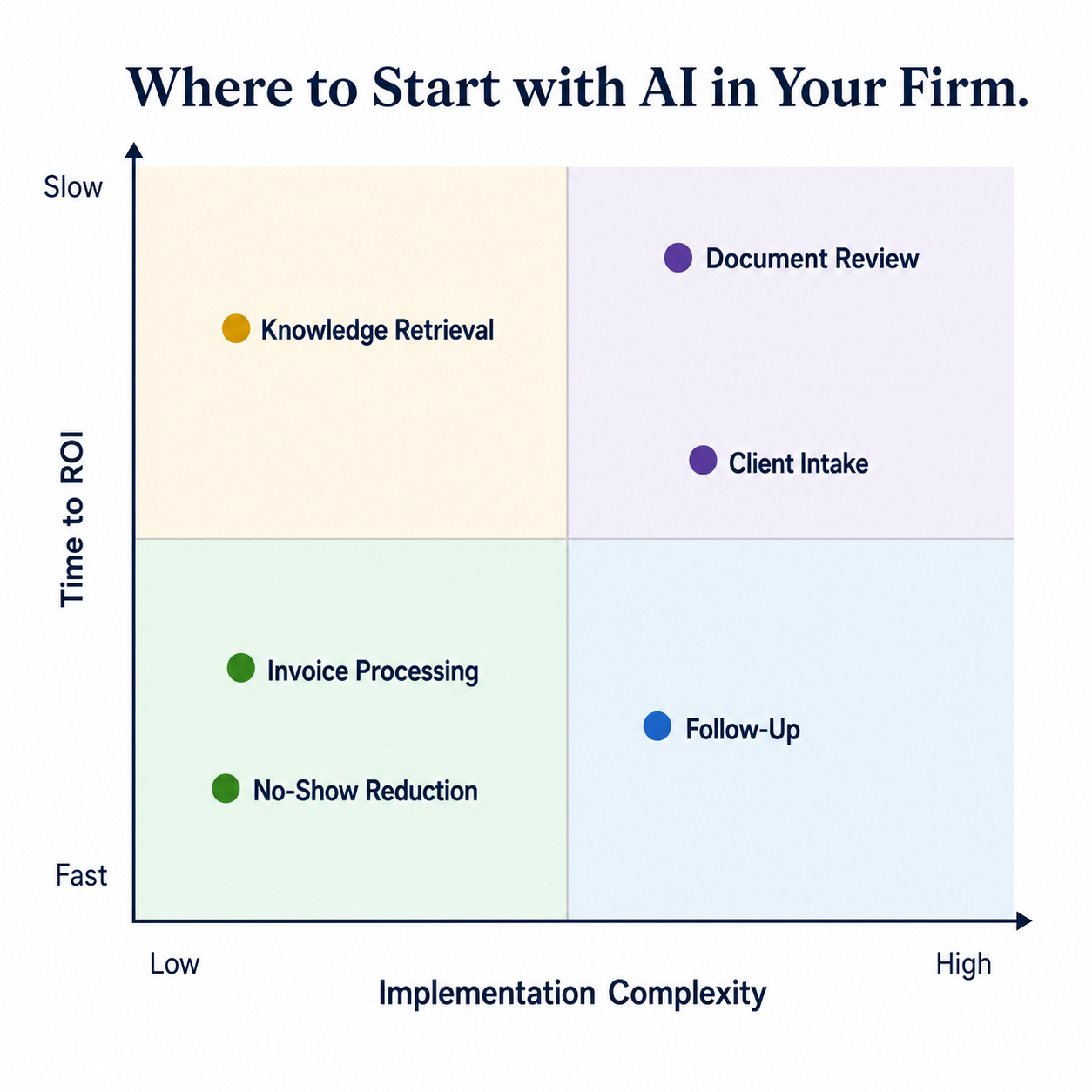
If I'm advising a 10 to 50 person professional service firm with limited budget and limited capacity for change management, I'd prioritize in this order:
Start here: Billing and invoice processing. The ROI is fastest (6 to 12 months payback), the implementation is contained (it doesn't require changing how you serve clients), and the cost comparison is stark.
Second: Appointment scheduling and reminders. Low complexity, measurable results within 60 days, and every firm has appointment no-shows they're currently absorbing.
Third: Document review. Higher implementation complexity, but the time savings are the largest of any application and they compound directly into billable capacity.
Hold off on internal knowledge routing until you've cleaned up your data. It only works well when your existing documentation is organized. Most firms need 60 to 90 days of cleanup before the AI layer delivers real value.
The Honest Failure Mode

I've watched firms buy AI tools and get nothing from them. Consistently, the failure follows one of three patterns.
The tool without the process. They bought the software before documenting the workflow. The AI has nothing consistent to automate.
The pilot that never scaled. One person in the firm loved it, got great results in their corner, and then the project stalled because there was no organizational adoption plan.
The expectation mismatch. They expected AI to replace judgment, and it can't. AI is excellent at processing, classifying, routing, and surfacing. It's not excellent at deciding, advising, or relating. The firms that get the highest returns use AI to eliminate low-judgment work so their skilled professionals can spend more time on high-judgment work.
I've been building systems that had to work in the real world for 30 years, starting with one of the first major internet platforms before most people had heard the word "browser." The pattern I keep seeing is the same: technology works when you design for how humans actually behave, not how you wish they would.
AI in professional services is real. The ROI is real. The specific applications I've described here have the evidence base to back them up. But the implementation discipline is what separates the firms that capture those returns from the firms that spend six months and $40,000 and have very little to show for it.
If you want to know where to start for your specific firm, that's what Verity Agentic is built for. The practice is new, but the approach isn't: Cap Gemini consulting discipline, thirty years of building operational systems that couldn't fail, and hands-on experience building AI agents with today's tools. We don't sell software. We design the system, sequence the implementation, and measure what's actually working.
Start with the bottleneck. Everything else can wait.
Sources
[1] Thomson Reuters Institute, "2026 AI in Professional Services Report," https://www.thomsonreuters.com/en-us/posts/technology/ai-in-professional-services-report-2026/, 2026
[2] ReceiptsAI, "110+ AI Accounting and Automation Statistics (Updated June 2026)," https://receiptsai.com/ai-automation-accounting-statistics-2026, 2026
[3] Everlaw, "Am Law 100 Firm Slashed Doc Review Time by Two-Thirds with GenAI," https://www.everlaw.com/blog/case-studies/am-law-100-firm-slashed-doc-review-time-by-two-thirds-with-genai/, 2025
[4] GetCodes Health, "23 AI Medical Chronology Time Savings Statistics Every Legal Professional Should Know in 2026," https://www.getcodeshealth.com/blogs/ai-medical-chronology-statistics, 2026
[5] Wolters Kluwer, "Legal AI Adoption: Time Savings, Contract Review, Revenue Growth and Ethical Risks," https://www.wolterskluwer.com/en/expert-insights/legal-ai-adoption-time-savings-revenue-growth, 2025
[6] AgentiveAIQ, "How AI Client Intake Systems Boost Efficiency and Conversions," https://agentiveaiq.com/blog/how-ai-client-intake-systems-boost-efficiency-conversions, 2025
[7] Glassix, "Study Shows: AI Chatbots Enhance Conversion by 23% and Resolve Issues 18% Faster with 71% Success," https://www.glassix.com/article/study-shows-ai-chatbots-enhance-conversions-and-resolve-issues-faster, 2025
[8] Parseur, "AI Invoice Processing Benchmarks 2026: Accuracy, Speed, and Cost Comparison," https://parseur.com/blog/ai-invoice-processing-benchmarks, 2026
[9] AI Productivity, "Professional Services Automation ROI Framework 2026," https://aiproductivity.ai/guides/professional-services-automation-roi/, 2026
[10] Z360, "AI Appointment Reminder Software: Cut No-Shows by 40% Automatically," https://z360.biz/blog/ai-appointment-reminder-software/, 2025
[11] Landbase, "25 Email Sequence Statistics That Prove Automation Drives 320% More Revenue in 2026," https://www.landbase.com/blog/email-sequence-statistics, 2026
[12] Research and Markets, "AI-Driven Knowledge Management System Market Report 2026," https://www.researchandmarkets.com/reports/6103462/ai-driven-knowledge-management-system-market, 2026
[13] FutureOfConsulting.AI, "2026 Consulting's AI Revolution Update: Billions Spent, But the Old Pyramid Persists," https://futureofconsulting.ai/ai-leadership/2026-consultings-ai-revolution-update/, 2026