The Agentic AI Explained for People Who Run Real Businesses (No PhD Required)
Here's the scenario I keep seeing: a business owner hears the phrase "agentic AI" in a meeting, nods along, goes home, and Googles it. Three minutes later they're reading something about "multi-agent orchestration frameworks" and "ReAct loop architectures" and they close the tab in frustration.
That's not a knowledge problem. That's a communication problem. And it's one I'm going to fix right now.
I've been building systems that have to survive contact with reality for over 30 years. I founded adoption.com in 1995, before Google existed, back when putting a form on the internet that actually did something was considered radical. I've run operations in seven countries, including orphanages on three continents where the systems I built had to work even when the internet was unreliable, the staff rotated, and the stakes were high. I'm not a technologist who learned business. I'm a business operator who mastered technology.
So when I tell you that agentic AI is the most significant operational shift I've seen since the commercial internet went mainstream, I want you to understand I don't say that lightly. And I want you to understand exactly what it means, in plain English, before you make a single decision about it.

What an AI "Agent" Actually Is
Let's start with the word "agent." You already know what an agent does in the real world. A talent agent takes a goal (get my client a movie deal), perceives the situation (here are the studios, here's what they're looking for), makes decisions (pitch this studio first, not that one), takes actions (calls, emails, negotiations), and adapts based on what comes back (that studio passed, let's try a different angle).
An AI agent works the same way. It perceives a situation. It makes a decision. It takes an action. It observes what happened. Then it loops back and does it again until the job is done.
That loop is the key thing. A chatbot doesn't loop. You ask a chatbot a question, it gives you an answer, and it stops. An AI agent keeps going. [1]
The technical people call this the "observe-think-act" cycle, or sometimes the ReAct loop (Reasoning plus Acting). But you don't need the vocabulary. You just need to understand: an AI agent is software that can complete a multi-step task on its own, without you having to babysit every single step.
What It's Not
I want to be direct about something, because the AI marketing machine is working overtime right now.
Not everything calling itself an "AI agent" is actually an agent. Some of what vendors are selling is just a slightly smarter chatbot with a fancier name. A real agent does three things that a chatbot doesn't:
- It can take actions in external systems (send an email, update a record, make a booking).
- It maintains memory across steps, so it doesn't forget what it already did.
- It makes autonomous decisions about what to do next, not just what to say next.
If a tool can't do all three of those, it's not really an agent. It's a chatbot with branding.
The Four Parts of Every AI Agent
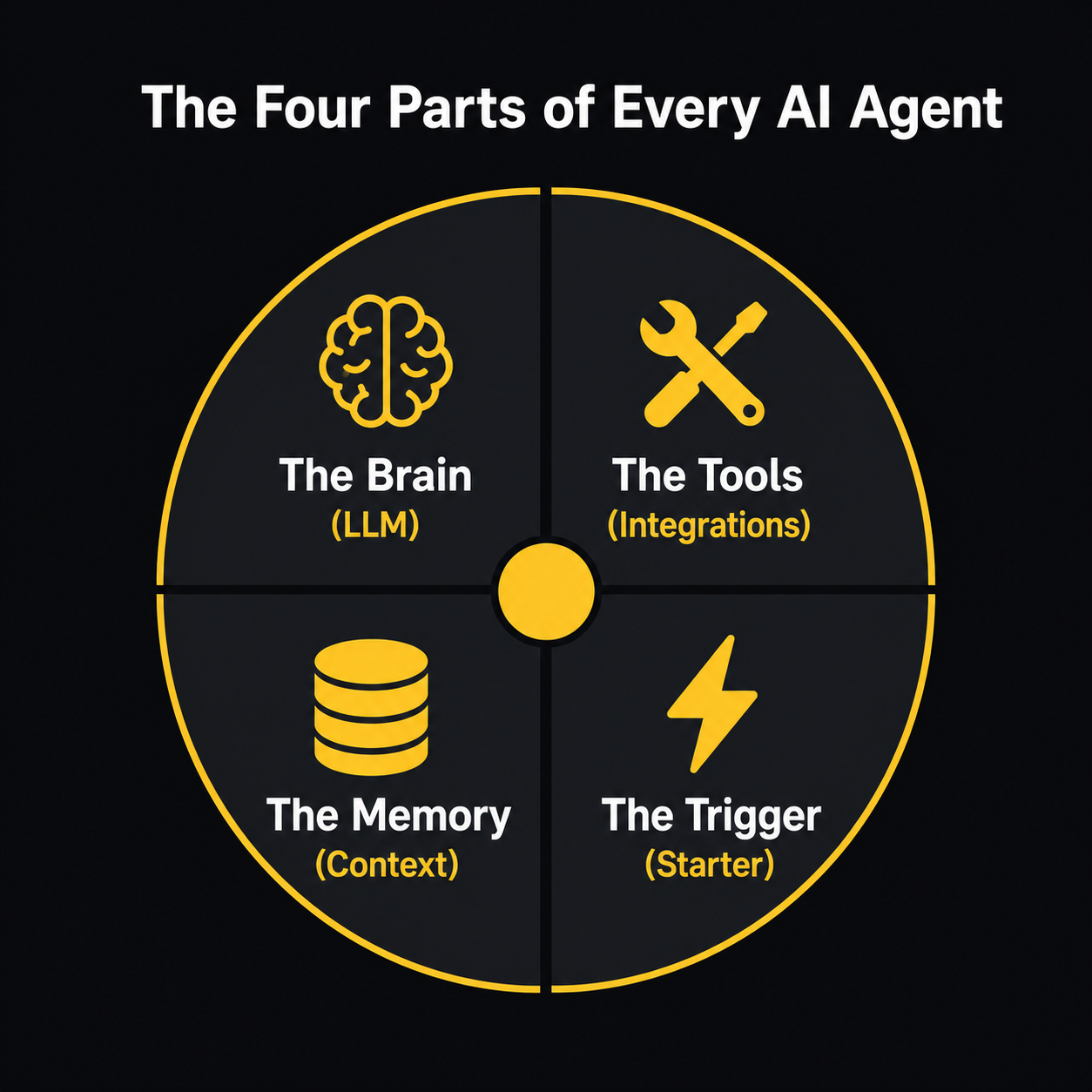
Here's the anatomy of any real AI agent, in terms a business operator can actually use. [2]
1. The Brain (the LLM)
At the center of every AI agent is a large language model. That's the GPT-4, Claude, Gemini type of AI that you're probably already familiar with from tools like ChatGPT. The LLM is the reasoning engine: it reads a situation, thinks through what to do, and decides on a next step.
Think of it as a very capable, very fast generalist who can read anything, synthesize it instantly, and communicate clearly in any language or format. The LLM's job is to think. It doesn't do anything itself: it decides what to do, then hands off to the next layer.
2. The Tools (the Integrations)
An LLM by itself can only produce text. Tools are what give the agent the ability to actually do things in the world.
Tools might include:
- A connection to your CRM (so the agent can read and update customer records)
- An email integration (so it can send messages on your behalf)
- A calendar connection (so it can check availability and create events)
- A web search capability (so it can look up current information)
- A database query tool (so it can pull reports or check inventory)
Every time you see a vendor say their agent integrates with Salesforce, HubSpot, Slack, or your ERP system, what they're actually saying is: we've given the brain a set of tools. More tools mean the agent can act in more places.
3. The Memory (the Context)
This is the part that most people miss, and it's actually the hardest part to get right.
An AI agent needs to remember what it's already done. If it emails a lead and then, three minutes later, forgets it emailed that lead, it's going to email them again. And again. That's not helpful: that's a harassment system.
There are two kinds of memory in an agent: short-term (what happened in this specific task, kept in the agent's working context) and long-term (facts about customers, preferences, history, stored in a database the agent can query). [3]
Getting memory right is where a lot of agent deployments actually fail. I've seen it. An agent that can't reliably remember what it did, or can't access the right historical context, is going to make decisions that don't make sense. More on that in the failure modes section.
4. The Trigger (the Starter Pistol)
Agents don't run on their own. Something has to start them. That trigger might be:
- A form submission on your website
- An email hitting a specific inbox
- A schedule (every Monday at 9 AM, pull last week's sales numbers)
- A webhook from another system
- A human clicking a button
The trigger is the signal that tells the agent: something happened, your job has started. Everything else flows from there.
One Agent, One Real Workflow
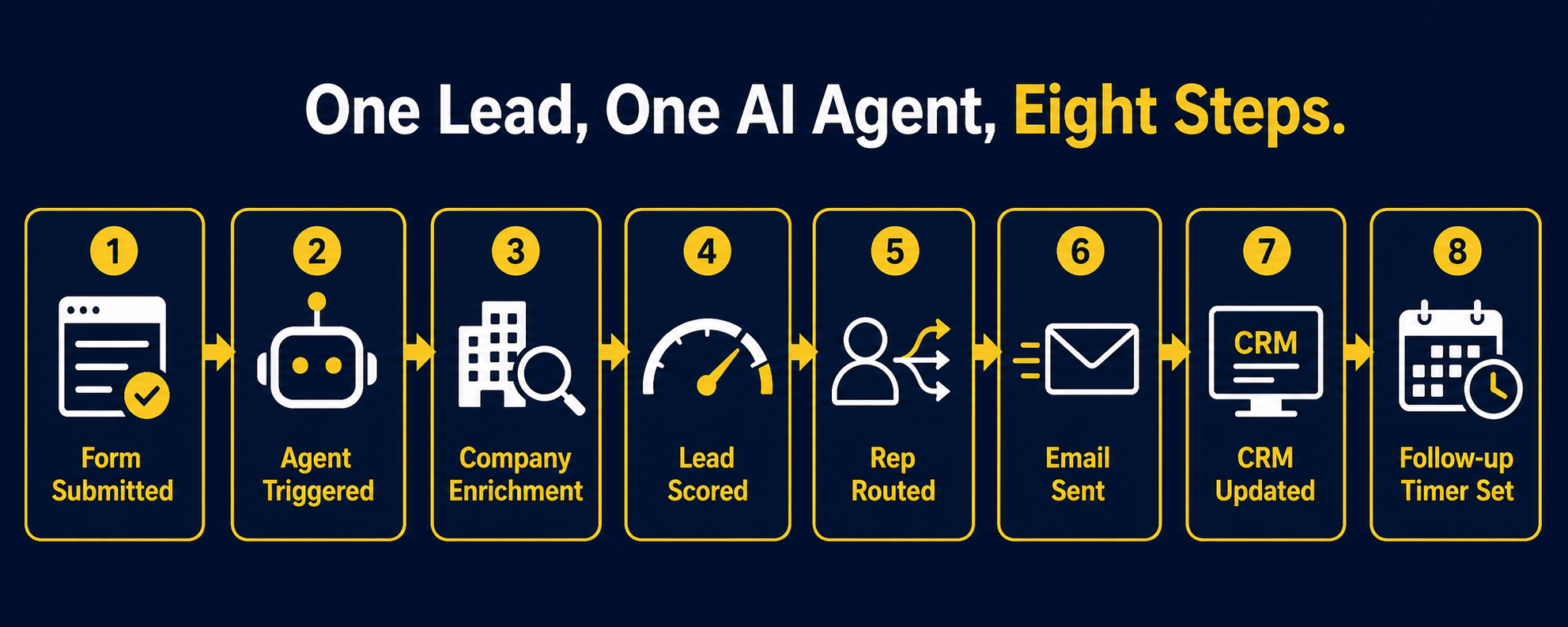
I'm going to walk you through a complete example. Not a hypothetical. This is the kind of workflow I help my clients build right now.
The scenario: You're running a B2B services company. You have a "Get a Quote" form on your website. Leads come in, and right now some human on your team has to see the form submission, Google the company, look them up in your CRM, figure out which sales rep handles that territory, send an intro email, add a note to the CRM, and set a reminder to follow up if no one responds. That whole process takes somewhere between 20 minutes and two days, depending on how busy your team is.
Here's what an AI agent does with the same form submission:
Step 1: The trigger fires. A lead fills out your "Get a Quote" form. That form submission is the trigger. The agent wakes up.
Step 2: Perception. The agent reads the form data: company name, contact name, email, job title, what they said they need.
Step 3: Enrichment. The agent uses its web search tool to look up the company. It finds their LinkedIn, their website, their approximate revenue range, their industry classification. It checks your CRM: has this company or anyone from it ever contacted you before? It checks your email system: has anyone on your team emailed this domain?
Step 4: Scoring. Based on what it found, the agent scores the lead. A VP of Operations at a 200-person manufacturing company asking about enterprise integration fits your ideal customer profile. A solo freelancer asking for a quick quote doesn't. The agent knows the difference because you've given it a scoring rubric. It assigns a score and flags the lead as hot, warm, or cold.
Step 5: Routing. The agent checks which sales rep handles that territory or vertical. It checks that rep's calendar to see if they're traveling or on PTO. If they're available, it routes the lead to them. If they're not, it routes to the backup.
Step 6: Action. The agent drafts and sends a personalized first-touch email to the lead within minutes of form submission. Not a generic "thanks for reaching out" email: a personalized one that references what they mentioned needing, includes something specific about their industry, and offers a concrete next step.
Step 7: CRM update. The agent creates or updates the contact record in your CRM. It logs the form submission, the enrichment data it found, the lead score, who it routed to, and what email it sent. No manual data entry.
Step 8: The follow-up logic. The agent sets an internal timer. If no one responds to that first email within 48 hours, it automatically sends a follow-up. If there's still no response after 5 days, it flags the lead for a human to review rather than continuing to chase.
That entire sequence runs in under five minutes from the moment the form is submitted. [4]
The human on your team never had to touch it. They receive a CRM notification that says: new hot lead routed to you, here's what we know about them, here's the email we already sent. Their job is now to have the relationship, not to do the data work.
Is this magic? No. It's a well-designed system with a clear job to do. But it's a system that would have required three to five humans to run reliably at scale six years ago.
Who's Actually Using This Right Now
I don't want to oversell the current state of agentic AI, because I've seen what happens when business operators get oversold on technology. They implement it wrong, it fails, and they conclude the technology doesn't work when really the implementation was the problem.
Here's what the data actually shows.
Gartner predicts that 40% of enterprise applications will feature task-specific AI agents by the end of 2026, up from less than 5% in 2025. [5] That's a significant acceleration. But Gartner also published a separate prediction that over 40% of agentic AI projects will be canceled by end of 2027. [6] Those two facts don't contradict each other. They describe the same thing: a massive wave of adoption, with a significant failure rate, because most organizations are building before they understand what they're building.
The McKinsey State of AI report from November 2025 found that 23% of organizations are actively scaling agentic AI systems, with another 39% experimenting. [7] That sounds like a lot. But when you look at the numbers on who's actually seeing results, it's a much smaller group. Only about 6% of organizations surveyed were classified as AI high performers, and they were more than 2.8 times more likely than their peers to have fundamentally redesigned their workflows rather than just dropping an AI tool into an existing process.
That last part is the thing I want you to hear. Dropping AI into a broken process doesn't fix the process. It automates the breakage.
The Klarna Example (and the Part Nobody Talks About)
The headline everybody cited in 2025: Klarna's AI agent handled the equivalent of 853 human customer service agents, saved the company $60 million, and reduced average resolution times by 82%. [8]
That's all true. What got less coverage: Klarna later had to rehire human agents because their customer satisfaction scores with complex, emotionally-charged cases had slipped. The AI was excellent at transactional queries (where's my order, process my refund, update my address). It was less good at the kind of nuanced, empathetic conversation that a frustrated customer needs when something has genuinely gone wrong.
That's not a failure of AI. That's a lesson about what AI agents are actually good at: structured, repeatable, high-volume tasks where the rules are clear. Not every customer interaction fits that profile.
JPMorgan Chase is running over 450 AI use cases in production, including agents that generate investment banking presentations in about 30 seconds, automate trade settlement, and detect fraud in real time. [9] That's also true. But JPMorgan has an $18 billion annual technology budget and hundreds of engineers. They're not a comparison point for most businesses.
The businesses I work with are more likely to be service companies, professional firms, manufacturers, or growth-stage operators who have anywhere from 10 to 500 employees. And the AI agent deployments that actually work for them tend to be narrower, more specific, and more carefully tested than what the enterprise headlines describe.
What AI Agents Are Actually Good At
Let me give you a direct, honest breakdown.
AI agents perform well when:
- The task is repetitive and rule-based at its core
- The inputs are mostly structured (form data, email text, database records)
- The definition of "done" is clear
- Mistakes are catchable before they cause real harm
- Volume is high enough that automation creates real leverage
AI agents struggle when:
- The situation requires genuine empathy or relationship judgment
- The data inputs are ambiguous, incomplete, or unstructured
- The stakes of a wrong decision are high and hard to reverse
- The process you're automating hasn't been documented and doesn't actually make consistent sense
That last point is important. Sales teams spend up to 60% of their time on administrative work, according to a 2025 Gartner report. [10] That's exactly the kind of problem AI agents can help with. But if your sales process is different every time depending on which rep is handling it, the agent is going to have trouble. You need to define the process before you can automate it.
The Failure Modes You Need to Know About
I'm going to be straight with you about where these systems fail, because I'd rather you hear it from me than learn it expensively on your own.
Hallucination
AI agents can make things up. If an agent is asked to enrich a contact record and it can't find reliable data, some agents will fill in plausible-sounding but incorrect information rather than returning a blank field. This isn't intentional deception: it's a technical artifact of how large language models work. But it means you cannot skip the verification layer. Anything an agent writes into a permanent record needs human review or cross-reference validation, especially in the early stages of a deployment.
Context Drift
In complex multi-step workflows, early errors can compound. One wrong assumption at step two can cascade through steps three, four, and five. This is especially true in multi-agent systems where different agents hand off work to each other. By the time you see the output, the error might be buried several layers deep. [11]
Over-automation
Some businesses I've consulted with have rushed to automate every touchpoint with AI, including ones where a human response would have been significantly better. Automating a condolence response, a complaint from a long-term client, or a contract negotiation with a prospect who's on the fence can cost you a relationship. The question isn't "can we automate this?" The question is "should we automate this?"
Governance Gaps
Gartner estimates that by 2028, 25% of enterprises will experience major business disruptions due to inadequate AI governance. Only 13% of organizations believe they currently have the right governance in place. [6] Those numbers should concern you if you're planning to give an AI agent access to your customer data, your email, or your financial systems without a clear policy on what it can and can't do.
What "Agentic AI" Looks Like at Human Scale

Here's what I tell every business operator I work with: you don't need to automate everything. You need to find the two or three processes in your business where high volume, repetition, and structured data create a clear opportunity for leverage. Then you build one agent, you test it carefully, you watch it fail in small ways, you fix those failures, and you scale it from there.
Microsoft's 2026 Work Trend Index found that active AI agents in the Microsoft 365 ecosystem grew 15 times year-on-year. [12] That's not because everyone suddenly understood AI. That's because the tools got better and the entry point got lower. You don't need to hire a team of engineers to build an agent anymore. There are platforms that let you wire together the brain, the tools, and the triggers without writing code.
But I want to be clear about something: the technology being accessible doesn't mean the strategy is obvious. I've seen smart, capable business operators spend six months and significant money building an AI agent for a process that didn't need an agent, while the process that actually needed automation sat untouched. The hard work isn't the building. It's knowing what to build.
That's what good AI systems consulting actually looks like. Not "here's a cool agent framework." Not "we'll automate everything." It's: here's where your business actually loses time, here's where the data is clean enough to act on, here's the narrowest possible version of an agent that solves a real problem, and here's how we know when it's working.
My Direct Recommendation
If you're a business operator who's been watching agentic AI from the sidelines because the coverage feels either too hyped or too technical, here's where I'd start.
Pick one process in your business that fits these criteria:
- It happens more than 50 times a month
- It currently requires a human to gather information from multiple places and then take a simple action
- The definition of "done" is clear and consistent
- A mistake is annoying but not catastrophic
Lead intake, invoice follow-up, appointment scheduling, support ticket routing, content distribution, inventory alerts. Those are the kinds of processes genuinely well-suited to an AI agent right now, with tools that exist and work.
Start narrow. Run it for 90 days with human review of every output. Track the error rate, track the time saved, track what the agent gets wrong and why. Then decide whether to expand.
I don't have a long roster of AI consulting clients to point to. What I do have is 30 years of building systems that had to survive contact with reality, a Cap Gemini background helping businesses navigate transformative technology before most people knew what the internet was, and hands-on experience building AI agents and web apps using Claude Code and Codex. I know what a working system looks like and I know what a failing one looks like, because I've been responsible for both.
The businesses that win with agentic AI won't be the ones who move fastest. They'll be the ones who move smartest.
Sources
[1] Oracle Developer Blog, "What Is the AI Agent Loop? The Core Architecture Behind Autonomous AI Systems," https://blogs.oracle.com/developers/what-is-the-ai-agent-loop-the-core-architecture-behind-autonomous-ai-systems, 2025
[2] DEV Community (Oz Farooq), "The Anatomy of an AI Agent: Memory, Tools, Planning, and Execution Explained," https://dev.to/ozfarooq/the-anatomy-of-an-ai-agent-memory-tools-planning-and-execution-explained-3il3, 2025
[3] LangCopilot, "LLM Agents Explained: Architecture, Tools, Memory and Multi-Agent Systems (2026)," https://langcopilot.com/posts/2025-09-17-llm-agents-explained-visual-guide-ai, 2025
[4] SISGAIN, "Agentic AI in CRM: Automate 70% of Customer Workflows," https://sisgain.com/blogs/agentic-ai-crm-automation-guide, 2025
[5] Gartner, "Gartner Predicts 40% of Enterprise Apps Will Feature Task-Specific AI Agents by 2026, Up from Less Than 5% in 2025," https://www.gartner.com/en/newsroom/press-releases/2025-08-26-gartner-predicts-40-percent-of-enterprise-apps-will-feature-task-specific-ai-agents-by-2026-up-from-less-than-5-percent-in-2025, 2025
[6] Gartner, "Gartner Predicts Over 40% of Agentic AI Projects Will Be Canceled by End of 2027," https://www.gartner.com/en/newsroom/press-releases/2025-06-25-gartner-predicts-over-40-percent-of-agentic-ai-projects-will-be-canceled-by-end-of-2027, 2025
[7] McKinsey & Company, "The State of AI in 2025: Agents, Innovation, and Transformation," https://www.mckinsey.com/capabilities/quantumblack/our-insights/the-state-of-ai, November 2025
[8] Klarna International / Customer Experience Dive, "Klarna AI Assistant Handles Two-Thirds of Customer Service Chats in Its First Month," https://www.klarna.com/international/press/klarna-ai-assistant-handles-two-thirds-of-customer-service-chats-in-its-first-month/, 2025; and CX Dive, https://www.customerexperiencedive.com/news/klarna-says-ai-agent-work-853-employees/805987/, November 2025
[9] Tearsheet, "JPMorgan Chase's Gen AI Implementation: 450 Use Cases and Lessons Learned," https://tearsheet.co/artificial-intelligence/jpmorgan-chases-gen-ai-implementation-450-use-cases-and-lessons-learned/, September 2025
[10] Gartner (cited in SISGAIN analysis), sales teams administrative time statistics, 2025
[11] Atlan, "AI Agent Risks and Guardrails: 2026 Enterprise Security Guide," https://atlan.com/know/ai-agent-risks-guardrails/, 2026
[12] Microsoft, "2026 Work Trend Index Report: Agents, Human Agency, and Opportunity," https://www.microsoft.com/en-us/worklab/work-trend-index/agents-human-agency-and-the-opportunity-for-every-organization, 2026